
For years, "building an agent in n8n" meant assembling one yourself: a chat trigger, a memory node, an AI Agent node with a handful of tools attached, and a workflow wrapped around the whole thing to hold it together. It worked. It still works. But it was never the same thing as an agent being a first-class part of the product.
That changed in September 2026 when n8n shipped Agents as a new top-level concept, sitting next to credentials and workflows. The interesting question is no longer "can I build an agent in n8n?" It is now a design question: should this process be an agent, a workflow, or both? Getting that wrong is how teams end up paying for model calls to do work a deterministic workflow would have done for free.
What actually changed in n8n
n8n now has three core things at the top level: credentials, which manage the connections to every other app, workflows, which hold deterministic logic and controlled AI use, and agents, the newest layer and the one where the AI has the most freedom in n8n.
An agent is not a workflow with a chat node. It is a packaged entity you brief. Every agent has a model, instructions written in plain language, channels and triggers (Slack, Telegram, Linear, Discord or a schedule), tools, reusable skills, optional sub-agents, uploaded knowledge files, memory across sessions, and a reviewable session log. You describe what the agent should do, and when you open it six months later the instructions still read like a brief you would hand to a colleague.
Two things did not change, and both matter. The AI Agent node inside workflows is untouched, so everything you already built keeps running. And the new agents live on the same canvas as everything else, so you are not choosing a side.
The three ways automation runs in n8n
Liam McGarrigle from n8n breaks this down in a four-minute video, which is genuinely the fastest way to get the mental model right. There are three modes, not two.
- Deterministic workflows. No AI at all. Fixed logic, fixed order, fixed output. They run fast, cheap and the same way every single time, and anyone opening the canvas can see exactly what happens. The n8n team's argument is blunt: you might not think you need this upfront, but as you build real production systems you always end up needing deterministic logic.
- Workflows with AI steps (semi-deterministic). Most of the process stays pure logic, and the model is called in for one defined job: classification, filling out data, or more advanced work where tools and several layers of AI are needed. The AI is a step in a process with a specific job to do.
- Agents. The agent is not confined to a step. It is its own entity, closer to a coworker with the autonomy to solve a problem the way it sees fit. You still limit its reach by restricting tools or requiring human approval on the sensitive ones.
Notice the difference in where judgement lives. In a workflow, the AI has a defined step with a defined contract. In an agent, the AI decides which tool to use and in what order, and the steps only emerge at runtime.

n8n agents vs workflows: the comparison table
| Deterministic workflow | Workflow with AI steps | n8n Agent | |
|---|---|---|---|
| Best for | Repeatable processes with a known sequence | Mostly fixed processes that need one AI judgement inside them | Open-ended tasks where the steps cannot be defined in advance |
| Who decides the steps | You do. Every branch is on the canvas | You define the process, the model decides inside one step | The agent decides at runtime, inside the limits you set |
| Predictability | Identical output on every run | Predictable path, variable output inside the AI step | Variable path, so guardrails and review matter |
| Running cost | Lowest, no model tokens | Low, one or two model calls per execution | Highest, several model and tool calls per task |
| Build effort | Fast, and trivial to audit | Medium, each AI step needs a clear contract | Fast to start, prompts and tools need iteration |
| Oversight | Full. Every path is visible before it runs | Approvals attach to a specific step | Tool allowlists, human-in-the-loop, session review |
When to use an n8n agent
Three signals are reliable, and they all point the same way.
- You cannot draw the steps in advance. A team member asks in Slack why a customer's usage dropped last month. Answering takes several rounds: pull the account, ask which product line they mean, check the support history, come back with a summary and a follow-up question. Each step depends on the last answer, so there is no process to lay out.
- The input is different every time. A support email, a new GitHub issue, a vague request. You know the domain but not the task. That is the definition of agent work.
- The work needs tools chosen at runtime. When the correct tool for step two depends on what step one discovered, sequencing it in advance is guesswork.
For those jobs, the old approach meant forcing an open-ended conversation into a workflow. Possible, and plenty of people did it, but it took real work to build and even more work to change. Agents are built for that shape of problem.
When not to use an n8n agent
This is the part the agent hype skips. If the steps are known, an agent adds cost, latency and unpredictability without adding capability. Anything with a hard rule, a fixed calculation, or a compliance requirement belongs in deterministic logic.
The pattern that ages well is to push everything repetitive down into workflows and let the agent focus on the decisions that genuinely need judgement. A support agent with three workflow tools (get account context, add a note to the account, page on-call) is the model working as intended: the agent decides, the workflows execute exactly what you allowed. The n8n blog calls the boring workflow "the highest compliment you can pay a workflow," and that is exactly right. Boring is the point.
How agents and workflows work together
This is where the value sits, and it runs in both directions.
Workflows become the agent's tools. Any workflow with the right trigger can be used as a tool by an agent. Your existing automations turn into capabilities the agent can call, without exposing raw API credentials or letting the model improvise an integration. You choose per tool how much control you keep.
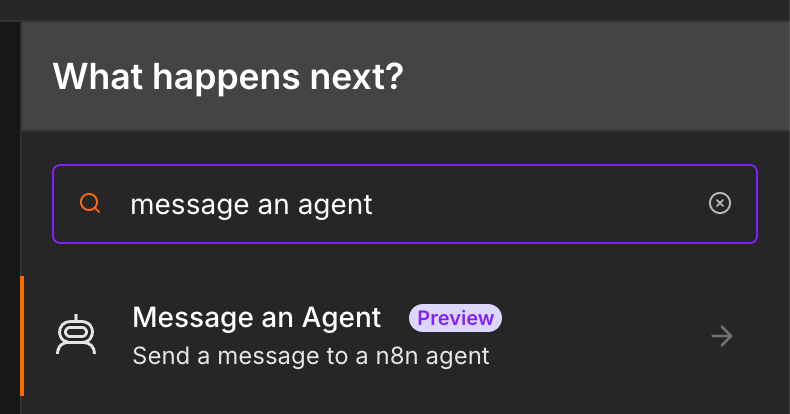
Agents run inside workflows. The new agents are available on the canvas, so a workflow can hand a step to the same agent that also lives in Slack, then continue with deterministic logic. The Message an Agent node is how that call happens. The n8n team's example: hand something off to that marketing assistant inside a workflow, or build a more advanced integration with webhooks for an embedded chat or support bot powered by an agent underneath.
The explainer, chapter by chapter
If you want the primary source, the whole model is covered in under four minutes. The chapters map cleanly onto the decision you are making:
| Time | Chapter | Why it matters |
|---|---|---|
| 0:00 | Credentials, workflows, and agents | The three top-level concepts, and where the AI has the most freedom |
| 0:27 | What agents are | Defining capabilities, skills and personality for tasks with no predefined steps |
| 0:46 | Building a marketing assistant | A real example: Miro and Notion as tools, marketing skills, reachable in Slack |
| 1:16 | Deterministic workflows | Why you always end up needing logic that runs identically every time |
| 1:50 | Using AI for specific steps | The semi-deterministic middle: the AI as a defined step in a process |
| 2:21 | Agents vs agent nodes | Agents are entities, not steps. Autonomy versus a defined job |
| 2:48 | Combining both | Workflows as agent tools, and agent judgement inside workflows |
| 3:03 | Using agents inside workflows | The Message an Agent node, embedded chat and support bot patterns |
| 3:29 | Getting access | Cloud rolling out in phases, and how to enable agents on self-hosted instances |
Cost and control: the trade you are actually making
Because agents behave like a coworker, they consume tokens like one. One task can mean several model calls and several tool calls, where a deterministic workflow makes none. That is not a reason to avoid agents, it is a reason to place them precisely.
Control works the same way. A workflow's oversight is structural: every branch and every action is visible on the canvas before anything runs. An agent's oversight has to be designed, which in practice means three things: a tool allowlist so the agent can only reach what it is allowed to reach, approval checkpoints on any action that changes a real system, and session review so you can see every step the agent took and the input and output of each call.
A five-question checklist
- Can you draw the steps in advance? If yes, build a workflow. If you cannot draw it, you are describing an agent.
- Must the same input always produce the same output? Keep it deterministic, and add a single AI step for the fuzzy part only.
- Does the next step depend on the previous answer? That is a conversation, which means an agent with memory and sessions.
- Could a wrong action be expensive or irreversible? Put the action in a workflow behind an approval and let the agent prepare it.
- Does the input look different every single time? Then you want an agent, with its tools limited to the systems it may actually touch.
How we apply this at n8n Lab
We build on the client's own n8n instance, cloud or self-hosted, and we start from the processes they already run. Existing workflows become the agent's tools rather than being thrown away, which keeps the current automations and the audit trail intact.
The first deliverable of any build is a decision map: for each process, should it be a deterministic workflow, a workflow with one AI step, or an agent, and why. That single document prevents the most expensive mistake in this space, which is using an autonomous layer to do work that should have been logic.
Key takeaway: agents and workflows are not competitors, they are two layers of the same system. Use workflows for everything you can define, agents for the work you cannot, and connect them in both directions. The teams that get this right ship autonomy where it earns its keep and deterministic logic everywhere else.
Want a decision map for your own processes? See how we build specialised n8n agents or book a free 30-minute automation audit.

![AI Agents vs AI Workflows [Complete Guide]: A Production Decision Framework](https://storage.googleapis.com/n8nauts.firebasestorage.app/blog-images/ai-agents-vs-n8n-workflows.jpg)
